
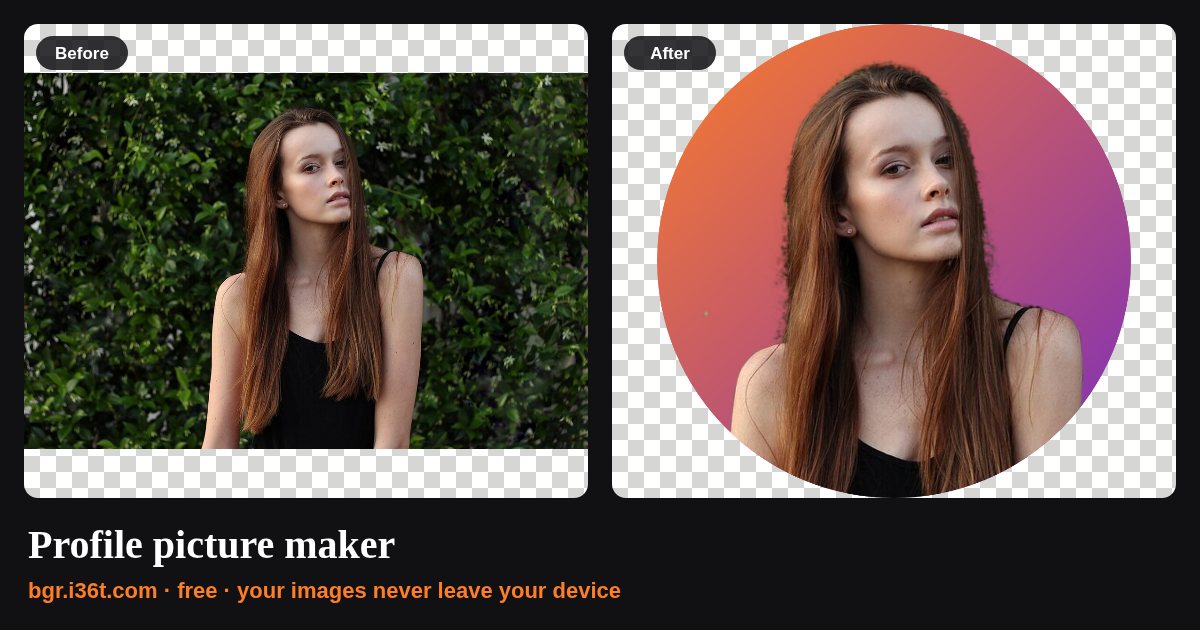
How to use the profile picture background remover
- Add a head-and-shoulders photo.
- Your background is replaced with a gradient and cropped to a circle.
- Adjust zoom and position in Size, and colors in Background.
- Download the PNG; the corners outside the circle are transparent.
What people use it for
- Work chat and email avatars
- Professional network profiles
- Team pages with a consistent look
- Gaming and community accounts
Tips for a clean result
- Face the light, such as a window, rather than standing in front of it.
- A white or colored outline helps a face stand out at tiny sizes.
- Many sites crop to a circle themselves; upload the square version if they do.
Which option to choose
| Option | Best for | Watch out for |
|---|---|---|
| Solid color | Professional and calm | Pick contrast with your clothing |
| Gradient | Friendly and modern | Keep it subtle for work |
| Blurred original | Natural look | Less tidy at small sizes |
Private by design
Background Remover does its work inside your browser. Your pictures are not uploaded, stored or seen by us. We record anonymous usage such as which tool was used and the export format. Read the privacy details.
Frequently asked questions
What size should a profile picture be?
This preset is 1000 × 1000 pixels, large enough for common platforms.
Can I keep it square?
Yes. Turn off circle crop in the Size tab.
Is my face used to train anything?
No. The photo never leaves your device.
More free tools
Remove background
- Background Remover
- Remove white background
- Transparent PNG maker
- Remove background from logo
- Signature background remover
- Product photo background remover
- Change background color
- Blur photo background
- Passport photo background
- Remove green screen
- Batch background remover